> ## Documentation Index
> Fetch the complete documentation index at: https://quantstruct.mintlify.site/llms.txt
> Use this file to discover all available pages before exploring further.

# Render Markdown Messages

> Learn how to render markdown messages using the `useLopusChat` hook

This guide will walk you through the process of rendering markdown messages in your React application using the `useLopusChat` hook. We'll cover the setup, rendering logic, and best practices to ensure a smooth integration.

## Prequisites

1. Ensure you have a React application setup
2. Complete the [quickstart guide](/quickstart)
3. Install `react-markdown` package

<CodeGroup>
  ```bash npm theme={null}
  npm install react-markdown
  ```

  ```bash pnpm theme={null}
  pnpm add react-markdown
  ```

  ```bash yarn theme={null}
  yarn add react-markdown
  ```

  ```bash bun theme={null}
  bun add react-markdown
  ```

  ```bash deno theme={null}
  deno install npm:react-markdown@latest
  ```
</CodeGroup>

## Upgrade Your Message Component with `ReactMarkdown`

Return messages inside a `ReactMarkdown` component instead of a `div`:

<CodeGroup>
  ```tsx Message.tsx theme={null}
  import React, { ReactElement, JSXElementConstructor } from 'react';
  import ReactMarkdown from 'react-markdown';

  export function Message({ message }: MessageProps) {
    return (
      <div
        className={`mb-2 p-2 rounded ${
          message.sender === 'USER'
            ? 'bg-blue-600 text-white ml-auto'
            : 'bg-gray-200 text-black'
        } max-w-[80%]`}
      >
        {(() => {
          switch (typeof message.content) {
            case 'string':
              return (
                <ReactMarkdown className="prose max-w-none">
                  {message.content}
                </ReactMarkdown>
              );
            case 'object':
              if (React.isValidElement(message.content)) {
                return message.content;
              }
              return <div>{JSON.stringify(message.content)}</div>;
            default:
              return (
                <ReactMarkdown className="prose max-w-none">
                  {String(message.content)}
                </ReactMarkdown>
              );
          }
        })()}
      </div>
    );
  } 

  interface Message {
    content: string | ReactElement<unknown, string | JSXElementConstructor<any>> | Record<string, unknown>;
    sender: 'USER' | 'ASSISTANT';
  }

  interface MessageProps {
    message: Message;
  }
  ```

  ```tsx MessageList.tsx theme={null}
  import React, { ReactElement, JSXElementConstructor } from 'react';
  import { Message } from './Message';

  export function MessageList({ messages, isLoading }: MessageListProps) {
    return (
      <div className="flex-1 overflow-auto mb-4">
        {messages.map((message, index) => (
          <Message key={index} message={message} />
        ))}
        {isLoading && <div className="text-gray-500">Loading...</div>}
      </div>
    );
  } 

  interface Message {
    content: string | ReactElement<unknown, string | JSXElementConstructor<any>> | Record<string, unknown>;
    sender: 'USER' | 'ASSISTANT';
  }

  interface MessageListProps {
    messages: Message[];
    isLoading: boolean;
  }


  ```

  ```tsx ChatInput.tsx theme={null}
  import React, { useState } from 'react';

  export function ChatInput({ onSubmit, isLoading }: ChatInputProps) {
    const [input, setInput] = useState('');

    const handleSubmit = async (e: React.FormEvent) => {
      e.preventDefault();
      if (!input.trim()) return;
      
      try {
        await onSubmit(input);
        setInput('');
      } catch (error) {
        console.error('Failed to send message:', error);
      }
    };

    return (
      <form onSubmit={handleSubmit} className="flex gap-2">
        <input
          type="text"
          value={input}
          onChange={(e) => setInput(e.target.value)}
          className="flex-1 p-2 border rounded text-black placeholder-zinc-400 border-zinc-600 focus:outline-none focus:border-blue-500"
          placeholder="Type your message..."
        />
        <button
          type="submit"
          disabled={isLoading}
          className="px-4 py-2 bg-blue-600 text-white rounded disabled:bg-zinc-600 disabled:text-zinc-400 hover:bg-blue-700"
        >
          Send
        </button>
      </form>
    );
  } 

  interface ChatInputProps {
    onSubmit: (message: string) => Promise<void>;
    isLoading: boolean;
  }
  ```

  ```tsx ChatComponent.tsx theme={null}
  'use client';
  import { useLopusChat } from "lopus-ai";
  import { MessageList } from './components/MessageList';
  import { ChatInput } from './components/ChatInput';

  export default function ChatComponent() {
    const { messages, sendQuery, isLoading } = useLopusChat({
      apiKey: 'your_api_key_here',
    });

    return (
      <div className="flex flex-col h-screen p-4 bg-gray-100">
        <MessageList messages={messages} isLoading={isLoading} />
        <ChatInput onSubmit={sendQuery} isLoading={isLoading} />
      </div>
    );
  }
  ```
</CodeGroup>

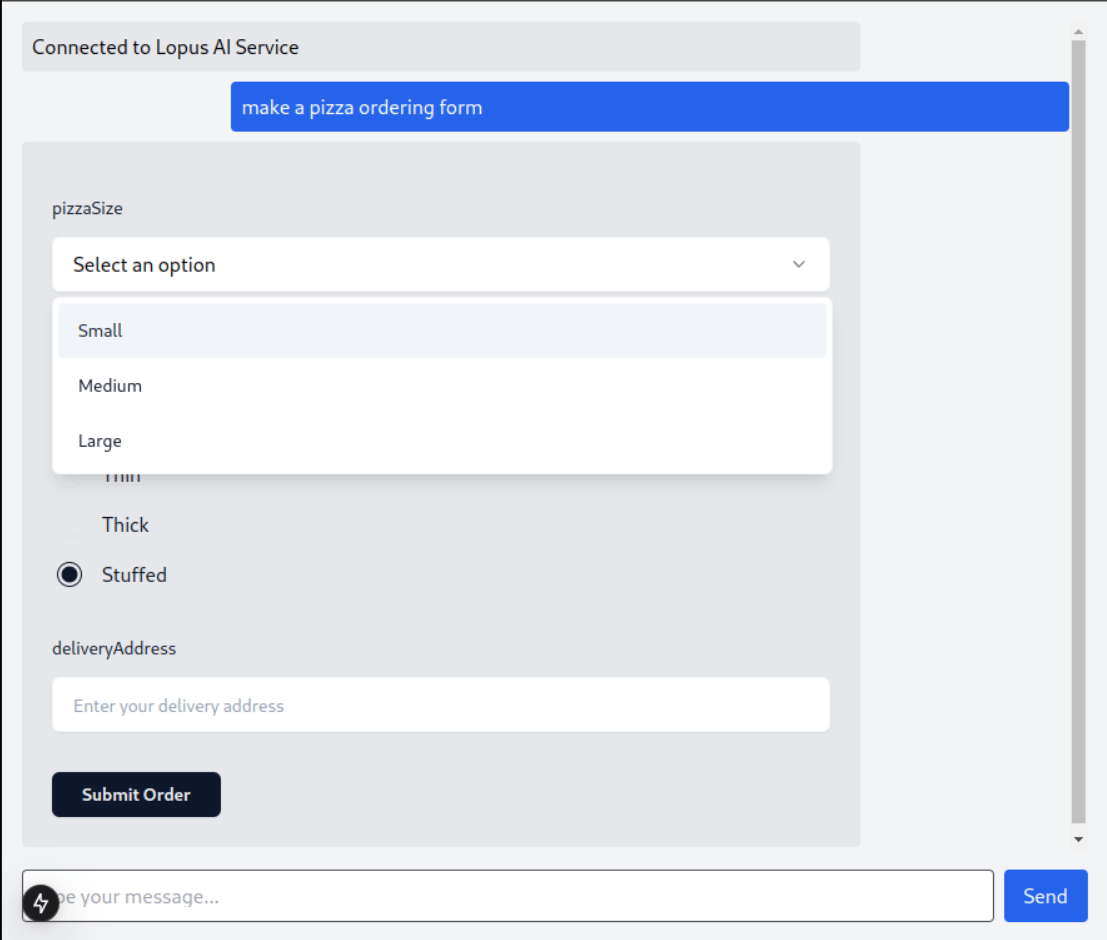
Your Lopus Chat Component can now render markdown messages:

<Frame as="div" caption="Lopus Chat Component">
  <img src="https://mintcdn.com/quantstruct/Bf_2o5pJp9znI0yX/images/lopus_chat_component.png?fit=max&auto=format&n=Bf_2o5pJp9znI0yX&q=85&s=0c58d0fce920526fce399607236c9adb" alt="" width="1107" height="940" data-path="images/lopus_chat_component.png" />
</Frame>

# Best Practices

1. **Type Safety:** Use type guards like `isReceivedMessage` to safely handle different message types.
2. **Error Handling:** Wrap `sendQuery` and `sendSubmission` calls in try-catch blocks to manage errors effectively.
3. **Component Handling:** For messages containing components, ensure they are rendered correctly.
4. **Cleanup:** The hook manages cleanup automatically, but ensure to remove any custom message handlers if added.

By following these steps, you can effectively render markdown messages in your React application using the `useLopusChat` hook. This setup allows for a rich, interactive chat experience.
